
 Install Chrome Extension
 Install Chrome Extension — It's Free
Open Figma for a screenshot?
Paste into Figma, add a background, export. Twenty minutes for something that should take twenty seconds.
⚡ Lifetime deal: $9.99 one-timePay once, use forever.Limited spots →
Capture any webpage, make it look stunning, and share it anywhere in seconds. No Figma. No Canva. No friction.
★★★★★Used by creators, founders & developers worldwide
FEATURES
Capture. Beautify. Annotate. Share.
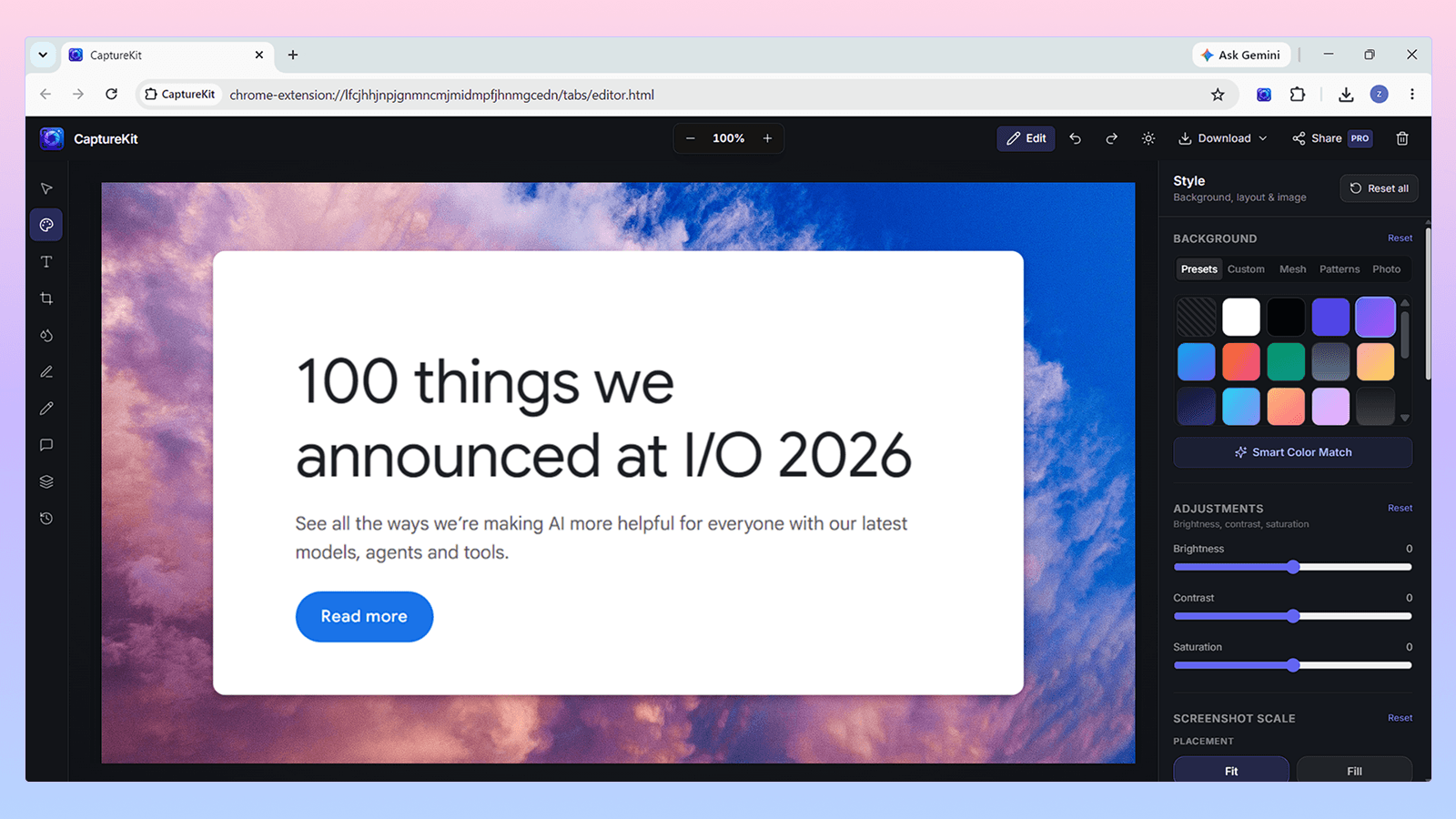
Sound familiar?
Paste into Figma, add a background, export. Twenty minutes for something that should take twenty seconds.
Raw browser screenshots get zero engagement. Beautiful gradients get 500 retweets on the same content.
Xnapper and CleanShot X don't work on Windows. CaptureKit runs in Chrome — on any OS.
Introducing CaptureKit
No design skills. No Figma. No Canva. Open the extension, capture, beautify, export.
Any webpage, any area
Gradients & shadows
Export anywhere
How it works
Visible area, custom selection, or full-page scroll & stitch. Custom viewports for mobile, tablet, and desktop.
20+ gradient backgrounds, cinematic shadows, padding controls, and one-click presets for Twitter, LinkedIn, and Product Hunt.
Arrows, highlights, shapes, blur for sensitive data. Export as PDF, PNG, or JPG. Share to Slack, email, or WhatsApp.
Copy to clipboard or export in HD 2x / 3x. No watermark on Pro.
“Finally a screenshot tool that doesn't make me open Figma just to add a gradient. This is what Xnapper should have been — but in the browser and on Windows.”
Alex M.
SaaS founder
“I use this every time I share a product update on Twitter. People actually ask what tool I use.”
Jordan K.
Product designer
“Paid $9.99 lifetime and felt guilty it was so cheap. Use it every single day.”
Sam R.
Content creator
“Replaced our entire client annotation workflow. Send a PDF with pinned comments instead of a long confusing email.”
Taylor L.
Agency owner
Simple pricing
Launching with a lifetime deal at $9.99. No subscription. No renewal. Ever.
$0forever
Good enough to get started.
No account needed
Pay once. Own it forever.
Goes to $59/year after launch period ends.
14-day money back guarantee · Secure checkout via DodoPayments
Compare
The only browser screenshot tool that beautifies, annotates, and works on Windows.
CaptureKit
Xnapper
CleanShot X
GoFullPage
CaptureKit
Xnapper
CleanShot X
GoFullPage
CaptureKit
Xnapper
CleanShot X
GoFullPage
CaptureKit
Xnapper
CleanShot X
GoFullPage
CaptureKit
Xnapper
CleanShot X
GoFullPage
CaptureKit
Xnapper
CleanShot X
GoFullPage
CaptureKit
Xnapper
CleanShot X
GoFullPage
CaptureKit
Xnapper
CleanShot X
GoFullPage
CaptureKit
Xnapper
CleanShot X
GoFullPage
Works on Windows
Chrome on any OS
In-browser
No desktop app needed
Full toolkit
Beautify + annotate + export
Built for you
From solo founders to agency teams — one tool for every screenshot workflow.
Capture product updates, Stripe dashboards, and feature launches. Beautify for Twitter and Product Hunt in seconds.
Turn any webpage into share-ready visuals for LinkedIn, newsletters, and social. No Canva. No Figma.
Screenshot client sites, annotate feedback, share as PDF. Clean, professional, no back-and-forth confusion.
Capture UI bugs with precise annotations, share visual context with teammates on Slack. Show don't tell.
You pay $9.99 once and get full Pro access forever. No yearly renewals. No subscription. All future updates included at no extra cost.
No fixed end date — but it ends when we hit our launch goal. After that: $59/year only.
No. Free features work without signing in. You only need an account to activate Pro.
Yes. CaptureKit works on Chrome on any OS — Windows, Mac, Linux. Fully supported.
Yes. Full refund within 30 days. Email: support@capturekit.online
Yes — text, highlight, and freehand draw are free. Arrows, blur, shapes, and the full toolkit require Pro or Lifetime.
Yes. Any page you can open in Chrome, including localhost and dev environments.
Get CaptureKit free and grab the lifetime deal at $9.99 while it lasts.
Free forever · 14-day refund on Lifetime · No questions asked